

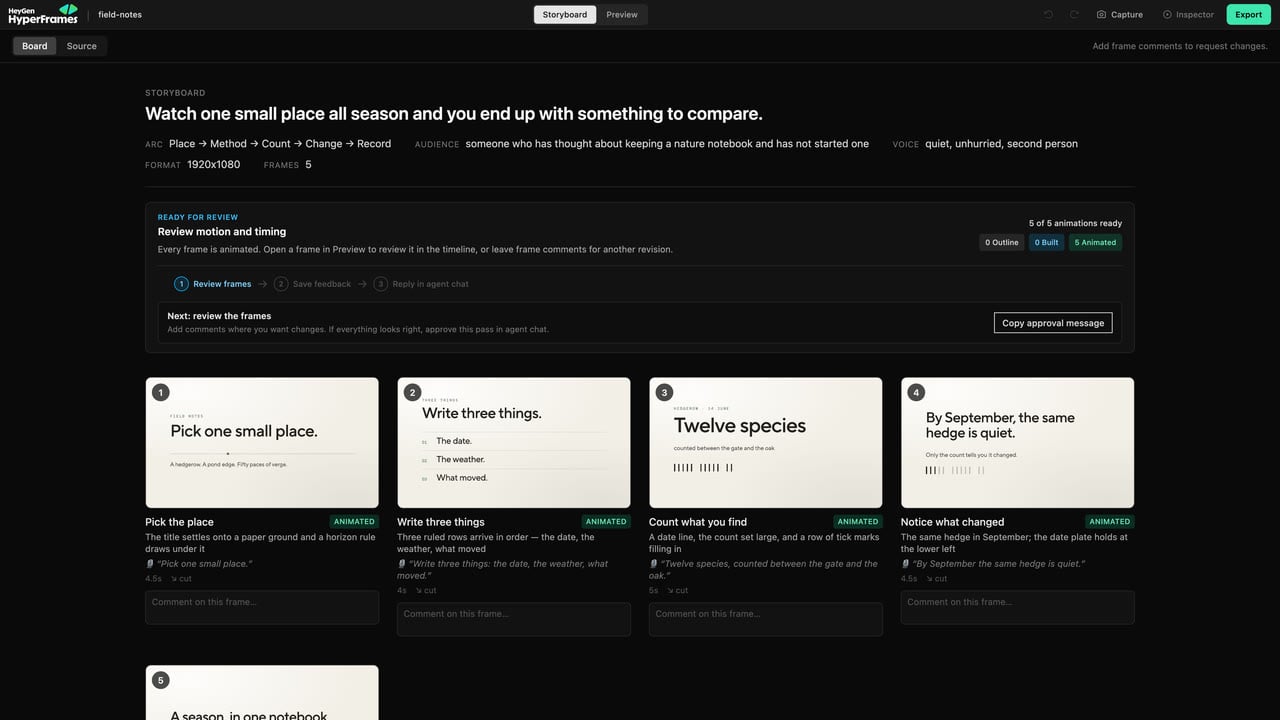
Read the arc, inspect each planned frame, and leave story-level feedback before changing the build.
Use the frame statuses
- Outline — the frame is still a plan.
- Built — a working scene exists.
- Animated — motion has been added and the scene is ready for closer review.
Review one frame
- Open Storyboard.
- Focus the frame you want to inspect.
- Read its visual direction and voiceover together.
- Check whether the frame supports the main message.
- Leave a concrete comment.
- Choose Save & copy message, then paste the message into your agent chat.
Board view and source view
Use the board when you want to understand the sequence visually. Use the source view when you need to inspect or edit the storyboard text and structured direction more directly. The voiceover shown on the board is a guide. When the project has aSCRIPT.md, that file is the final source for generated narration.
When to move to Preview
Built and Animated frames can include Open in Preview. Use it when the question becomes:- Is the timing right?
- Is the text readable?
- Does the animation feel correct?
- Is an element aligned?
- Does the media crop work?